Few things are as frustrating in the kitchen as reaching for your freshly microwaved meal, only to find it riddled with cold spots and unevenly heated areas. This common annoyance often points to a single culprit: a microwave oven turntable that has stopped spinning. The spinning turntable is a simple yet crucial component, designed to ensure your food heats consistently by rotating it through the microwave’s energy field. When it ceases to function, cooking efficiency plummets, leaving you with disappointing results.
This comprehensive guide will delve into the world of microwave turntable issues, helping you understand why your microwave oven’s plate might not be rotating and providing step-by-step troubleshooting solutions. From simple fixes you can perform at home to identifying when it’s time to call a professional, we’ll equip you with the knowledge to get your microwave back to optimal performance, ensuring every meal is heated perfectly.
Understanding Your Microwave Turntable System
At the heart of every modern microwave oven, the turntable system plays a vital role in the cooking process. Its primary purpose is to ensure that microwave energy is distributed evenly across your food. Microwaves don’t heat uniformly throughout the oven cavity; instead, they create “hot spots” and “cold spots.” By continuously rotating your food, the turntable moves it through these different zones, allowing for consistent and thorough heating. Without this rotation, food placed in a cold spot would remain undercooked, while food in a hot spot might overcook or burn.
The turntable system typically comprises a few key components:
- Glass Tray: The removable plate where you place your food.
- Roller Ring: A plastic ring with small wheels that supports the glass tray and allows it to glide smoothly.
- Turntable Coupler (or Drive Bushing): A small, often three-pronged, plastic component located in the center of the microwave floor. It connects the glass tray to the drive motor below.
- Turntable Motor: A small electric motor mounted underneath the microwave oven’s floor, responsible for rotating the coupler and, subsequently, the glass tray.
Each part must function correctly for the turntable to spin. Understanding their roles is the first step in diagnosing any issues.
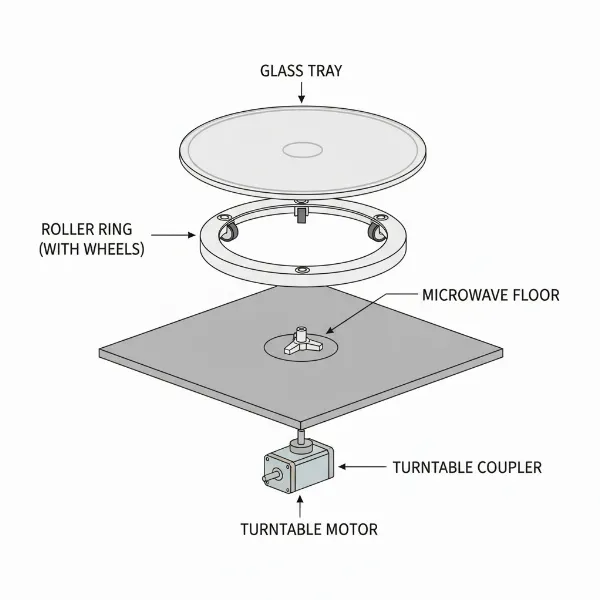 Diagram of microwave turntable system components: glass tray, roller ring, coupler, and motor.
Initial Checks: Quick and Easy Fixes
Before delving into more complex troubleshooting, begin with these simple checks. Many turntable issues can be resolved with basic adjustments or cleaning.
First, always unplug your microwave oven from the power outlet before performing any inspection or cleaning inside the appliance. This is a critical safety measure.
-
Is Your Turntable Designed to Spin?
It might sound obvious, but some older microwave models and many commercial-grade microwaves do not feature a spinning turntable. Instead, they use alternative methods, like a stirrer fan, to distribute microwave energy. If you’ve recently acquired a microwave and notice the plate isn’t spinning, quickly consult the user manual to confirm it’s designed to do so. If it’s an older model or a commercial unit, a stationary plate might be entirely normal. -
Proper Placement of the Glass Tray and Roller Ring
A common reason for a non-spinning turntable is improper placement. The glass tray has specific grooves or indentations on its underside that must correctly engage with the turntable coupler. Similarly, the roller ring needs to be seated flat and centered on the microwave floor.- Remove the glass tray and roller ring.
- Check for any signs of misalignment or if the tray is upside down.
- Carefully re-seat the roller ring, ensuring all its wheels are on the track.
- Place the glass tray back onto the roller ring and coupler, gently rotating it until it drops securely into place. You should feel it “lock” onto the coupler.
-
Check for Obstructions or Food Debris
Even a small crumb or a splash of dried food can impede the turntable’s movement. Over time, food particles and grease can accumulate in the roller ring track or around the coupler, creating friction or outright blocking the components.- With the microwave unplugged, remove the glass tray and roller ring.
- Visually inspect the microwave floor, especially the track where the roller ring sits and the area around the coupler, for any trapped food debris, spills, or grease buildup.
- Clean these areas thoroughly with a damp cloth and mild soap. Ensure everything is dry before reassembling.
After performing these initial checks, plug the microwave back in and test it with a cup of water for 30 seconds. If the turntable still isn’t spinning, it’s time to investigate further.
Common Reasons Your Microwave Turntable Isn’t Spinning
If the basic checks didn’t resolve the issue, the problem likely lies with one of the main components of the turntable system. Here are the most frequent culprits:
Dirty or Damaged Roller Ring
The roller ring, typically a circular plastic support with three small wheels, is designed to help the glass tray rotate smoothly. When this component is dirty or damaged, it can prevent proper movement.
- Symptoms: The turntable may move unevenly, make grinding noises, or stop completely. You might see visible debris in the track or notice the wheels are stiff.
- Diagnosis: Remove the glass tray and then the roller ring. Inspect the ring for cracks, warping, or missing/stuck wheels. Check the track on the microwave floor for debris.
- Fix: Clean the roller ring and the track thoroughly with warm, soapy water. If the ring is visibly damaged (cracked, warped, or missing wheels), it will need to be replaced. These parts are usually inexpensive and readily available online or from appliance parts stores.
|
Our Picks for the Best Microwave oven in 2026
As an Amazon Associate I earn from qualifying purchases.
|
||
| Num | Product | Action |
|---|---|---|
| 1 | BLACK+DECKER EM720CB7 Digital Microwave Oven with Turntable Push-Button Door, Child Safety Lock, 700W, Stainless Steel, 0.7 Cu.ft |

|
| 2 | GASLAND 30 Inch Over-the-Range Microwave Oven, 1.7 Cu.Ft Over Stove Microwave, 1000W with 10 Power Levels, Sensor & One-Touch Cooking, 300 CFM Venting, LED Cooktop Light, Black Kitchen Microwave |
|
| 3 | Chefman Countertop Microwave Oven 0.7 Cu. Ft., 700 Watts with 10 Power Levels, 6 Cooking Presets with One-Touch Express Cook, Eco Mode, Child Safety Lock, & Mute Button - Black |
|
| 4 | TOSHIBA EM131A5C-BS Countertop Microwave Ovens 1.2 Cu Ft, 12.4" Removable Turntable Smart Humidity Sensor 12 Auto Menus Mute Function ECO Mode Easy Clean Interior Black Color 1000W |
|
| 5 | COMFEE' Retro Small Microwave Oven With Compact Size, 9 Preset Menus, Position-Memory Turntable, Mute Function, Countertop Perfect For Spaces, 0.7 Cu Ft/700W, Cream, AM720C2RA-A |
|
| 6 | COMFEE CMO-C20M1WH Retro Microwave with 11 power levels, Fast Multi-stage Cooking, Turntable Reset Function Kitchen Timer, Speedy Cooking, Weight/Time Defrost, Memory function, Children Lock, 700W |
|
| 7 | COMFEE' Retro Small Microwave Oven With Compact Size, 9 Preset Menus, Position-Memory Turntable, Mute Function, Countertop Microwave For Small Spaces, 0.7 Cu Ft/700W, Green, AM720C2RA-G |
|
| 8 | COMFEE' Retro Small Microwave Oven With Compact Size, 9 Preset Menus, Position-Memory Turntable, Mute Function, Countertop, Perfect For Small Spaces, 0.7 Cu Ft/700W, Red, AM720C2RA-R |
|
| 9 | TOSHIBA EM131A5C-SS Countertop Microwave Ovens 1.2 Cu Ft with 12.4" Removable Turntable Smart Humidity Sensor, 12 Auto Menus Mute Function ECO Mode Easy Clean Interior, 1000W, Silver |
|
| 10 | COMFEE' EM720CPL-PMB Countertop Microwave Oven with Sound On/Off, ECO Mode and Easy One-Touch Buttons, 0.7cu.ft, 700W, Black |
|
Worn or Broken Turntable Coupler
The turntable coupler, also known as the drive bushing or spindle, is a small plastic piece that transmits rotational force from the motor to the glass tray. It often has a “D” shape or three spokes that fit into the center of the glass tray.
- Symptoms: The turntable motor might be audible (humming or clicking) and spinning, but the glass tray remains stationary. This suggests the connection between the motor and the tray is compromised.
- Diagnosis: Remove the glass tray and roller ring. Examine the coupler carefully. Look for signs of wear, such as stripped plastic splines, cracks, or if the coupler appears loose or broken. A worn coupler might simply spin freely on the motor shaft without engaging the tray.
- Fix: A broken or worn coupler cannot be repaired and must be replaced. Ensure you get the correct part for your specific microwave model. Replacement is usually a straightforward process: simply lift the old coupler off the motor shaft and press the new one into place.
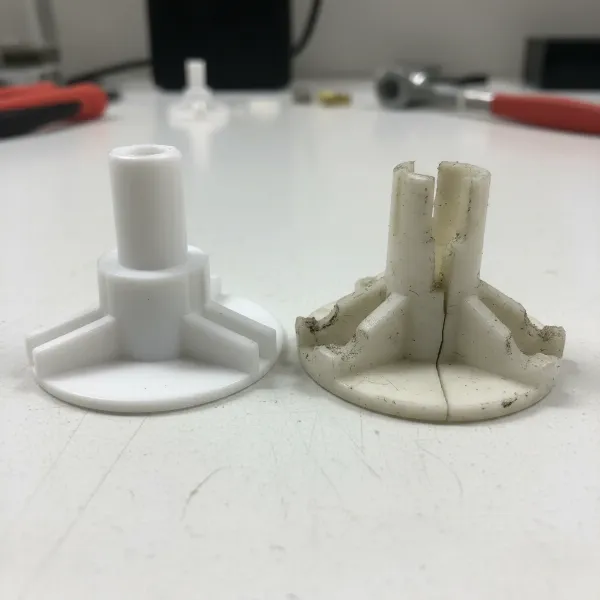 Close-up of a damaged or worn microwave turntable coupler, showing stripped splines.
Faulty Turntable Motor
The turntable motor is the core power unit that drives the entire rotation mechanism. If the motor itself fails, no amount of cleaning or adjusting other components will make the turntable spin.
- Symptoms: The microwave heats food, but the plate stays completely still. You might hear a faint clicking or humming sound coming from underneath the microwave (especially if the motor is trying to engage but cannot) or no sound at all from the motor when the microwave is running.
- Diagnosis: This usually requires more advanced troubleshooting and possibly a multimeter to test for continuity. If the other components (tray, ring, coupler) are in good condition and correctly seated, a non-spinning turntable often points to a motor issue.
- Fix: A faulty turntable motor needs to be replaced. While this is a DIY-friendly repair for many, it involves accessing internal components and requires careful attention to safety. If you are uncomfortable with electrical work, it is best to call a professional technician.
Less Common Issues
Occasionally, other factors might contribute to a non-spinning turntable:
- Control Panel Malfunction: In rare cases, the electronic control board or a specific “turntable on/off” button (if your model has one) could be faulty. This is less common and harder to diagnose without specialized tools.
- Door Latch Issues: Some microwaves have safety interlocks connected to the door. If the door isn’t closing and latching perfectly, certain functions, including the turntable, might not activate. Ensure the door closes firmly and the latch mechanism isn’t damaged.
Step-by-Step Troubleshooting Guide
Let’s walk through the troubleshooting process in detail, prioritizing safety at every step.
WARNING: ALWAYS UNPLUG YOUR MICROWAVE OVEN BEFORE PERFORMING ANY INTERNAL INSPECTION OR REPAIR. MICROWAVES CONTAIN HIGH-VOLTAGE CAPACITORS THAT CAN STORE A LETHAL ELECTRICAL CHARGE EVEN WHEN UNPLUGGED. IF YOU ARE UNCOMFORTABLE OR UNSURE ABOUT ANY STEP, CONTACT A QUALIFIED APPLIANCE TECHNICIAN.
- Unplug the Microwave Oven: This is non-negotiable. Disconnect the appliance from its power source completely.
- Remove Turntable Components:
- Lift out the glass turntable tray.
- Remove the roller ring from the microwave floor.
- Gently lift the plastic coupler from the center spindle.
- Inspect and Clean:
- Glass Tray: Wash thoroughly with warm, soapy water. Check for any chips or cracks, which could affect balance.
- Roller Ring: Clean the wheels and the entire ring. Spin the wheels individually to ensure they move freely. Look for any damage like cracks or warping. If the wheels are stiff or damaged, replace the ring.
- Coupler: Wash and inspect for stripped splines (the ridges that connect to the glass tray), cracks, or any other wear that would prevent it from gripping the tray or the motor shaft effectively. If damaged, replace it.
- Microwave Cavity Floor: Clean the track where the roller ring sits and the area around the motor shaft opening. Remove all food debris, grease, or spills.
- Reassemble and Test:
- Ensure the microwave cavity is completely dry.
- Carefully place the clean roller ring back into its track.
- Re-seat the coupler firmly onto the motor shaft.
- Place the glass tray back, aligning its grooves with the coupler and centering it on the roller ring. Gently rotate the tray to ensure it sits flush and feels stable.
- Plug the microwave back into the power outlet.
- Place a cup of water on the turntable and run the microwave for 30-60 seconds. Observe if the turntable spins smoothly.
If the turntable still doesn’t spin after these steps, the issue is likely internal, pointing towards the turntable motor.
Replacing a Microwave Turntable Motor: When to DIY or Call a Pro
If you suspect a faulty turntable motor, you have two main options: a DIY replacement or calling a professional.
DIY Turntable Motor Replacement (Proceed with Caution):
Replacing a microwave turntable motor is often considered a moderate DIY repair, but it requires electrical safety awareness and basic tool use.
- Ensure Safety: Unplug the microwave. As mentioned, internal capacitors can hold a lethal charge. While the turntable motor itself is usually located in a lower-voltage section, extreme caution is advised. Avoid touching any large capacitors.
- Access the Motor: You will typically need to flip the microwave over (onto its top or side, protected by a towel) to access the bottom panel. Remove the screws holding this panel in place and carefully detach it to expose the motor compartment.
- Disconnect the Old Motor: The turntable motor is usually a small, round component with wires connected to it. Note how the wires are connected (taking a picture can be helpful), then disconnect them. Unscrew any mounting screws or clips holding the motor in place and remove it.
- Install the New Motor: Align the new motor, secure it with screws or clips, and reconnect the wires exactly as they were on the old motor.
- Reassemble and Test: Replace the bottom panel and secure it with screws. Flip the microwave upright, re-insert the glass tray and roller ring. Plug it in and test with a cup of water.
“While many minor microwave issues can be tackled by a homeowner, internal electrical components, especially near the high-voltage capacitor, pose a significant safety risk. If you’re not experienced with appliance repair, it’s always safer to consult a certified technician for motor replacement.” – John Smith, Master Appliance Technician at AppliancePro Services
When to Call a Professional:
- You’re uncomfortable with electrical work: If handling internal components makes you nervous, or if you’re unsure about safety procedures.
- The plate still won’t spin after cleaning and replacing the roller ring/coupler: This strongly indicates a motor or control board issue.
- You hear clicking or humming sounds from underneath the microwave but no rotation: This is a classic sign of a failing motor.
- Your microwave is a built-in model: These can be more complex to remove and re-install, making professional service more practical.
- Uncertainty about the diagnosis: If you can’t pinpoint the exact cause, a professional can quickly identify the problem.
Maintaining Your Microwave Turntable for Longevity
Preventing turntable issues often comes down to simple maintenance and careful use:
- Regular Cleaning: Make cleaning the glass tray, roller ring, and microwave floor a routine part of your kitchen chores. This prevents food buildup that can hinder movement.
- Proper Loading: Avoid overloading the turntable. Excessively heavy items can strain the motor and other components, leading to premature wear. Distribute food evenly on the tray.
- Careful Handling: When removing or replacing the glass tray, do so gently. Dropping or forcing it can damage the coupler or crack the glass itself.
- Avoid Metal in Microwave: While not directly related to the turntable, always remember to avoid metal objects, foil, or dishes with metallic trim in your microwave. This can cause arcing and damage the appliance.
Safety Precautions When Working with Your Microwave Oven
Microwave ovens, while convenient, contain high-voltage components that can be extremely dangerous if mishandled. Adhere to these safety rules:
- Always Unplug: Before any inspection, cleaning, or repair, unplug the microwave from the wall outlet.
- Beware of Capacitors: The high-voltage capacitor inside a microwave can store a lethal electrical charge for a significant time, even after the unit is unplugged. Never touch internal components unless you are specifically trained to safely discharge a capacitor. For turntable motor replacement, you are typically working on the underside, away from the main high-voltage components, but caution is still paramount.
- Do Not Operate Damaged Microwaves: If your microwave oven is sparking, making unusual noises, or has a damaged door or casing, discontinue use immediately and seek professional repair.
- Use Correct Parts: When replacing any part, ensure it is the correct OEM (Original Equipment Manufacturer) or equivalent part specified for your microwave model.
Conclusion: Getting Your Microwave Back on Track
A non-spinning microwave oven turntable can be an annoying inconvenience, but it’s often a fixable problem. By systematically checking the glass tray, roller ring, and coupler for misalignment, debris, or damage, you can often restore your microwave’s functionality with minimal effort.
Remember to prioritize safety by always unplugging your microwave before any inspection or repair. While many basic issues can be resolved with a bit of DIY troubleshooting, don’t hesitate to contact a qualified appliance technician if the problem persists or if you are uncomfortable dealing with internal electrical components. With these tips, you can ensure your microwave oven continues to provide evenly heated meals for years to come. What common microwave issues have you successfully tackled yourself?
Frequently Asked Questions
Can I use my microwave if the turntable isn’t spinning?
Yes, most microwave ovens will still heat food even if the turntable isn’t spinning. However, the food will heat unevenly, leading to cold spots and potentially undercooked areas. For optimal results and food safety, it’s best to fix the turntable.
How much does it cost to replace a microwave turntable motor?
The cost to replace a microwave turntable motor varies depending on the microwave model and whether you do it yourself or hire a professional. The motor part itself can range from $15-$50, while professional labor can add another $50-$150 or more, depending on your location and the complexity of the repair.
What is the turntable coupler?
The turntable coupler, also known as a drive bushing or spindle, is a small plastic component located in the center of the microwave oven’s floor. It connects the motor underneath the microwave to the glass turntable tray, transmitting the rotational power to make the tray spin.
How often should I clean my microwave turntable components?
It’s recommended to clean the glass tray, roller ring, and the microwave floor (especially the roller track) regularly, ideally after every few uses or whenever spills occur. A thorough cleaning once a week or every other week can prevent debris buildup and ensure smooth operation.
My microwave makes a grinding noise but the plate doesn’t spin. What’s wrong?
A grinding noise from your microwave oven when the plate isn’t spinning often indicates an issue with the roller ring, turntable coupler, or the turntable motor itself. The grinding could be caused by debris in the roller track, a stripped coupler, or a motor struggling to turn due to internal wear or obstruction.