Your microwave oven is an indispensable kitchen companion, offering unparalleled convenience for quick meals and reheating leftovers. But what happens when this workhorse suddenly flashes cryptic letters and numbers on its display? These are microwave error codes, your appliance’s way of communicating a problem. Understanding what these codes mean can save you time, frustration, and potentially costly repair bills, helping you decide if it’s a simple fix or time to call in the experts.
What is a Microwave Oven and How Does it Work?
A microwave oven is a kitchen appliance that heats food by exposing it to electromagnetic radiation in the microwave frequency range. Unlike traditional ovens that heat food from the outside in, microwaves penetrate the food, causing water molecules within to vibrate rapidly and generate heat. This process allows for fast and efficient cooking, defrosting, and reheating, making it a staple in modern homes.
Types of Microwave Ovens
Microwave ovens come in various forms, each designed to meet different needs and kitchen setups. Understanding the type you own can sometimes give insight into potential error code complexities.
- Countertop Microwaves: These are portable and generally more affordable, offering basic functions. Their error codes typically relate to fundamental issues.
- Over-the-Range (OTR) Microwaves: Designed to be installed above your range, often incorporating ventilation fans and lights. These might have error codes related to their additional features, such as fan malfunctions.
- Built-in Microwaves: Integrated seamlessly into cabinetry, these often feature more advanced controls and sometimes even convection cooking capabilities. More sophisticated models may display a wider range of diagnostic codes.
- Convection Microwaves: These combine microwave technology with convection cooking, allowing for baking and roasting. Their added complexity can lead to error codes specifically tied to the convection heating elements or fan.
While mechanical dial models are less likely to display digital codes, most modern microwaves feature electronic controls and digital displays, making them prone to showing these diagnostic messages when something goes awry.
Understanding Microwave Error Codes: Your Appliance’s Language
Microwave error codes are essentially diagnostic messages built into the appliance’s electronic control system. They appear when the microwave detects an issue with one of its internal components or functions. Think of them as your microwave’s “check engine light.” The specific codes and their meanings can vary significantly between brands and even different models within the same brand. This is why your appliance’s user manual is an invaluable resource when an error code appears. It provides a brand-specific guide to decoding these messages and often offers initial troubleshooting steps.
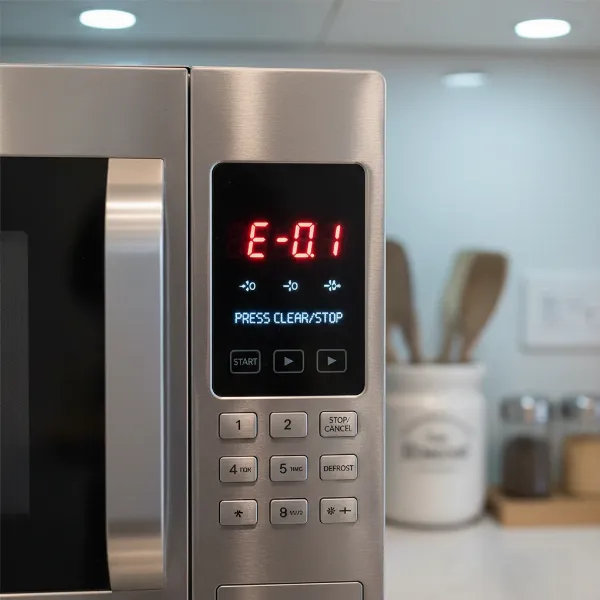 A microwave oven digital display showing a generic error code, indicating a problem with the appliance.
Common Microwave Error Code Categories and Their Meanings
While codes differ, the underlying problems often fall into common categories. Here’s a breakdown of the most frequently encountered error types and what they typically signify, along with some brand-specific examples.
Temperature/Humidity Sensor Errors
These errors indicate a problem with the sensors responsible for monitoring the internal temperature or humidity levels within the microwave cavity. Overheating is a common trigger.
- What they mean: The microwave is either too hot, a sensor is faulty (open or shorted circuit), or there’s excessive steam buildup.
- Common codes:
- GE: F1 (Open Thermal Sensor), F2 (Shorted Thermal Sensor), F4 (Open Humidity Sensor), F5 (Shorted Humidity Sensor). These often point to issues caused by excessive heat in the cavity.
- Samsung: C-20, E-21, E-22 (Temperature sensor open or short), C-21, E-24 (Microwave temperature is high, overheating detected), C-70, C-71, C-72 (Excess steam or humidity).
- Basic troubleshooting:
- Unplug the microwave and allow it to cool down completely, often for an hour or more, especially for overheating codes.
- Ensure proper ventilation around the appliance.
- For humidity codes, clean the interior and leave the door open to air it out.
|
Our Picks for the Best Microwave oven in 2026
As an Amazon Associate I earn from qualifying purchases.
|
||
| Num | Product | Action |
|---|---|---|
| 1 | Chefman Countertop Microwave Oven 0.7 Cu. Ft., 700 Watts with 10 Power Levels, 6 Cooking Presets with One-Touch Express Cook, Eco Mode, Child Safety Lock, & Mute Button - Black |

|
| 2 | COMFEE CMO-C20M1WH Retro Microwave with 11 power levels, Fast Multi-stage Cooking, Turntable Reset Function Kitchen Timer, Speedy Cooking, Weight/Time Defrost, Memory function, Children Lock, 700W |
|
| 3 | GASLAND 30 Inch Over-the-Range Microwave Oven, 1.7 Cu.Ft Over Stove Microwave, 1000W with 10 Power Levels, Sensor & One-Touch Cooking, 300 CFM Venting, LED Cooktop Light, Black Kitchen Microwave |
|
| 4 | COMFEE' Retro Small Microwave Oven With Compact Size, 9 Preset Menus, Position-Memory Turntable, Mute Function, Countertop Perfect For Spaces, 0.7 Cu Ft/700W, Cream, AM720C2RA-A |
|
| 5 | TOSHIBA EM131A5C-BS Countertop Microwave Ovens 1.2 Cu Ft, 12.4" Removable Turntable Smart Humidity Sensor 12 Auto Menus Mute Function ECO Mode Easy Clean Interior Black Color 1000W |
|
| 6 | COMFEE' Retro Small Microwave Oven With Compact Size, 9 Preset Menus, Position-Memory Turntable, Mute Function, Countertop, Perfect For Small Spaces, 0.7 Cu Ft/700W, Red, AM720C2RA-R |
|
| 7 | BLACK+DECKER EM720CB7 Digital Microwave Oven with Turntable Push-Button Door, Child Safety Lock, 700W, Stainless Steel, 0.7 Cu.ft |
|
| 8 | COMFEE' Retro Small Microwave Oven With Compact Size, 9 Preset Menus, Position-Memory Turntable, Mute Function, Countertop Microwave For Small Spaces, 0.7 Cu Ft/700W, Green, AM720C2RA-G |
|
| 9 | TOSHIBA EM131A5C-SS Countertop Microwave Ovens 1.2 Cu Ft with 12.4" Removable Turntable Smart Humidity Sensor, 12 Auto Menus Mute Function ECO Mode Easy Clean Interior, 1000W, Silver |
|
| 10 | COMFEE' EM720CPL-PMB Countertop Microwave Oven with Sound On/Off, ECO Mode and Easy One-Touch Buttons, 0.7cu.ft, 700W, Black |
|
Control Panel/Keypad Errors
These codes usually point to issues with the touch-sensitive control panel or the main control board, which acts as the microwave’s “brain.”
- What they mean: A button might be stuck, the keypad might be faulty, or there could be a communication breakdown between the control panel and the main circuit board.
- Common codes:
- GE: F3 (Shorted touchpad panel), F10 (Shorted touch screen).
- Samsung: C-F2, -tE-, -TE- (Abnormal communication on the touch key), C-d0, -SE-, SE (Touch key pressed for more than 10 seconds), C-F0, C-F1, C-F2 (Problem with the microwave’s control board or communication between main and sub-MICOM).
- Basic troubleshooting:
- Inspect the control panel for any stuck or jammed buttons. Gently press each button to ensure it moves freely.
- Clean the keypad surface with a soft, damp cloth to remove any debris or moisture that might be causing phantom presses.
- Perform a hard reset by unplugging the microwave.
Door Switch/Interlock Errors
A critical safety feature, the door interlock system ensures the microwave only operates when the door is securely closed. Errors here prevent the microwave from starting.
- What they mean: The microwave’s sensor isn’t detecting that the door is properly closed. This could be due to a misaligned door, something blocking the door, or a faulty door switch/latch mechanism.
- Common indicators: Often displayed as “Door,” a specific code, or simply the microwave won’t start despite power.
- Basic troubleshooting:
- Ensure the door is firmly closed. Open and re-close it several times.
- Check for any obstructions, food debris, or damage around the door frame and latch.
- Inspect the door latch for visible damage.
Power Supply/Communication Errors
These codes relate to issues with the electrical power supplied to the microwave or internal communication failures between different electronic components.
- What they mean: The microwave experienced a power interruption (like a blackout or surge), or there’s a problem with the internal electronic communication.
- Common codes:
- GE: 888, 8888, PF (Power failure, often seen after initial installation or power restoration), 18 (Issue with the electronic control).
- Samsung: C-F0, E-83 (No communication between the main and sub MICOM).
- Basic troubleshooting:
- Perform a hard reset by unplugging the microwave for at least 30 seconds to a minute, then plug it back in. This often clears temporary power glitches.
- If it’s a “PF” code, simply press “Clear/Off” or “Cancel/Off” and reset the clock.
Temperature Probe Errors
Some advanced microwaves come with a temperature probe for precise cooking. Errors can occur if this probe isn’t used correctly.
- What they mean: The temperature probe is not properly inserted into the food or the microwave cavity, or the probe itself is faulty.
- Common codes:
- GE: “Probe” (Indicates an open temperature probe or that the probe is not plugged in during a temperature cook function).
- Basic troubleshooting:
- Ensure the temperature probe is firmly inserted into the food item and the microwave’s wall receptacle.
- Clean the probe if necessary.
Child Lock Activation
While not an error code, a “LOC” message can often be mistaken for one, causing confusion and preventing operation.
- What they mean: The child lock feature has been activated, preventing accidental use.
- Common codes: LOC, LOCK, L.
- Solution: Refer to your user manual, but typically, you’ll need to press and hold a specific button (often “Clear/Off” or “Cancel”) for 3 to 5 seconds to deactivate the lock.
Troubleshooting Common Microwave Errors: DIY Fixes
Before reaching for the phone to call a technician, many common microwave error codes can be resolved with simple DIY troubleshooting steps.
- The Universal First Step: Power Reset. Almost universally, the first thing to try for any error code is a hard reset. Unplug your microwave from the power outlet (or switch off the corresponding circuit breaker) for at least 1 to 5 minutes. This allows the internal electronics to fully discharge and reboot. Many transient errors, often caused by minor power fluctuations or glitches, can be cleared this way.
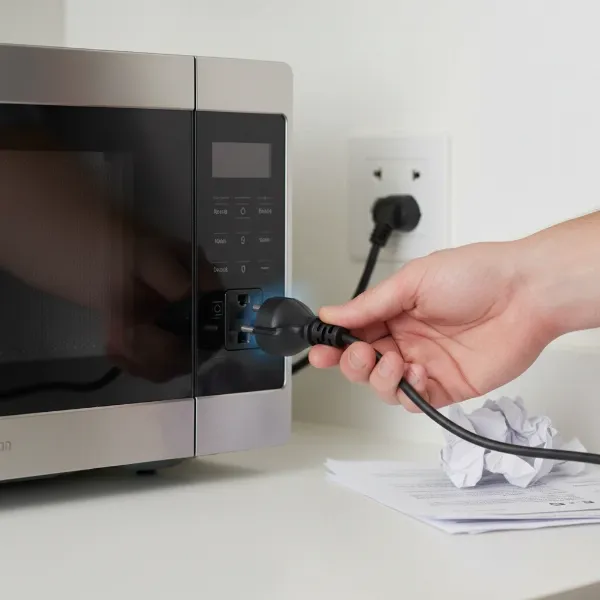 A hand unplugging a microwave oven from a wall outlet, demonstrating a hard reset troubleshooting step.
 - Checking the Door and Latch. For “Door” related messages or if the microwave simply won’t start, meticulously inspect the door. Ensure it’s fully closed and latched. Check for any food debris, utensils, or packaging that might be preventing it from sealing completely. Also, examine the door hinges and latch for any visible damage or misalignment.
- Cleaning for Sensor and Keypad Issues. A dirty or moist keypad can sometimes lead to phantom button presses or communication errors. Gently clean the control panel with a soft, slightly damp cloth. For humidity sensor errors, clean the microwave interior thoroughly and leave the door ajar for an hour or more to allow moisture to dissipate.
- Ensuring Proper Ventilation. Overheating errors can sometimes be exacerbated by poor ventilation. Make sure the microwave’s exhaust vents are not blocked by walls, cabinets, or other items. If it’s an over-the-range model, ensure the vent fan is clean and operational.
- Consulting Your User Manual. This cannot be stressed enough. Your microwave’s manual is the definitive guide for its specific error codes. It will often provide a detailed list of codes, their precise meanings, and tailored troubleshooting steps for your model. If you don’t have a physical copy, most manufacturers offer digital versions on their websites.
When to Call a Professional: Identifying Serious Issues
While many issues can be self-remedied, some error codes signal more serious problems that require the expertise of a qualified appliance technician. Attempting to fix complex electrical components, especially those involving high voltage, can be dangerous.
- Persistent Errors After Troubleshooting: If an error code reappears immediately after a hard reset, or if multiple troubleshooting attempts fail, it’s a strong indicator that the problem is beyond a simple user fix.
- Control Board Malfunctions: Errors like GE’s “18 power watch code” or Samsung’s C-F0, C-F1, C-F2 (indicating communication failure or control board issues) often point to a faulty main control board. This is a complex and often costly repair best left to professionals.
- Signs of Arcing, Smoke, or Burning Smell: Any visual signs of arcing (sparking inside the cavity), smoke, or a burning smell should prompt immediate action. Unplug the microwave at once and do not attempt to use it again. These are serious safety hazards.
- Magnetron-Related Issues: The magnetron is the core component that generates microwaves. Errors that hint at magnetron failure or other high-voltage component problems are extremely dangerous to diagnose or repair without specialized knowledge and equipment.
- Error Codes Indicating High Voltage Problems: Certain codes might explicitly refer to high voltage circuits. If you encounter such a code, it’s crucial to power down the appliance and seek professional help.
“Many minor microwave issues can be resolved with a simple unplug-and-wait, but always trust your gut. If something feels unsafe or doesn’t clear easily, don’t hesitate to call a certified technician. Your safety comes first.” – Sarah Chen, Appliance Repair Specialist
Maintaining Your Microwave to Prevent Future Errors
Proactive maintenance can significantly extend your microwave’s lifespan and reduce the likelihood of encountering frustrating error codes.
- Regular Cleaning: Keep the interior, exterior, and especially the door seals clean. Food splatters can build up, affecting sensors or blocking vents.
- Proper Use (No Metal): Avoid placing metal objects or containers in the microwave, as this can cause arcing and damage the magnetron or other internal components, leading to serious errors.
- Avoid Slamming the Door: Repeatedly slamming the microwave door can wear out or damage the door latch and interlock switches, potentially leading to door-related error messages.
- Ensure Proper Ventilation: Always ensure that your microwave has adequate space for ventilation, especially for models not designed for built-in installation. Blocked vents can lead to overheating.
Conclusion: Choosing the Right Microwave Oven
Understanding microwave error codes empowers you to quickly diagnose and potentially resolve issues, turning a moment of frustration into a simple fix. From basic power failures and stuck buttons to more complex sensor or control board malfunctions, each code tells a story about your appliance’s health. While many problems can be tackled with a simple hard reset or cleaning, knowing when to call a professional for persistent or dangerous issues is crucial for both your appliance’s longevity and your personal safety.
Don’t let a flashing code intimidate you. With a little knowledge and your user manual, you can keep your microwave humming along smoothly for years to come. What’s the most unusual microwave error code you’ve ever encountered?
Frequently Asked Questions
What does “PF” mean on my microwave display?
“PF” typically stands for “Power Failure.” This code appears when your microwave has experienced a temporary loss of power, such as during a power outage or a brief surge. It’s usually not a sign of a malfunction but rather an informational message. You can often clear it by pressing the “Clear/Off” or “Cancel/Off” button and then resetting the clock if your model has one.
Why does my microwave keep displaying a door error?
A persistent door error usually means the microwave’s safety interlock system isn’t detecting that the door is securely closed. Common reasons include food debris obstructing the door latch, a misaligned door, or a faulty door switch. Start by thoroughly cleaning around the door and inspecting the latch for any damage. If the error continues, a door switch replacement might be needed by a technician.
Can I reset my microwave’s error codes myself?
Yes, many common microwave error codes can be cleared by performing a hard reset. This involves unplugging the microwave from the power outlet for at least 30 seconds to a minute, then plugging it back in. This often resolves transient electronic glitches. However, persistent errors after a reset usually indicate an underlying hardware issue that may require professional attention.
Are all microwave error codes serious?
No, not all microwave error codes indicate a serious problem. Some, like “PF” (Power Failure) or “LOC” (Child Lock), are informational or indicate a feature is active, not a malfunction. Others, like certain sensor or keypad errors, might be resolvable with simple troubleshooting like cleaning or a reset. However, codes related to internal components, high voltage, or those accompanied by smoke or burning smells are serious and require immediate professional intervention.
How can I prevent microwave error codes?
Preventing error codes often comes down to good maintenance and proper usage. Regularly clean your microwave’s interior and door seals, ensure adequate ventilation around the appliance, and avoid slamming the door. Always follow the manufacturer’s guidelines, especially regarding what can and cannot be heated in the microwave (e.g., no metal). These practices help keep components functioning correctly and extend your microwave’s lifespan.